A persona tells you who someone is at work. A buying role tells you what they do in a specific purchase. Confuse the two and you'll build a beautiful audience model that still can't tell you why a deal stalled with the CFO's blessing but no IT sign-off.
That confusion gets more expensive every year. B2B buying committees are bigger than they used to be, more of that committee now shows up before your sales team ever gets a call, and a growing share of the research happens inside an AI tool instead of on your website — most of the buying decision now happens in rooms you're never in.
If your content strategy still treats "persona" and "buying role" as interchangeable — or worse, only plans for one of them — you're leaving gaps that both human buyers and AI answer engines will notice.
Here's the distinction, what's changed since we last covered this, and how we think about it at VelocityEngine.
What Is a B2B Persona?
A persona is a research-backed profile of a type of buyer, built around their job, priorities, and pressures rather than their name or title alone. It answers the question: who is this person at work, and what do they care about?
A persona typically captures:
- Job function and seniority (e.g., VP of Sales vs. Sales Ops Manager)
- Goals and KPIs they're measured against
- Day-to-day pain points and constraints
- How they prefer to consume information
A CFO persona cares about capital efficiency, risk, and payback period. A VP of Sales persona cares about pipeline coverage and rep productivity. Personas are relatively stable — the same CFO persona shows up whether your buyer is evaluating this deal or the one after it.
What Is a Buying Role?
A buying role describes what someone does during a specific purchase decision, independent of their job title. It answers a different question: what job is this person doing on this deal?
The classic buying-role framework (still the most useful starting point in 2026) includes:
- Initiator — surfaces the need and gets the evaluation started
- User — will actually use the product day to day
- Influencer — shapes the criteria and opinions of others without owning the final call
- Champion — sells the deal internally on your behalf
- Buyer / Procurement — negotiates terms, price, and contract structure
- Decision Maker — makes the final call
- Economic Buyer / Executive Approver — controls the budget and signs off
- Gatekeeper — controls access to other stakeholders or information
Buying roles are situational. The same person can hold more than one on a given deal, and roles can shift as the deal moves — the person who initiated the evaluation isn't always the one who champions it internally three months later. See how these roles map to real day-to-day priorities on our use cases by role page.
Persona vs. Buying Role: The Core Difference
|
Persona |
Buying Role |
|
|---|---|---|
|
Answers |
Who is this person, professionally? |
What are they doing on this deal? |
|
Based on |
Job function, goals, pain points |
Behavior within a specific purchase |
|
Stability |
Relatively fixed across deals |
Situational — can shift mid-deal |
|
Can one person hold more than one? |
No — a person has one primary persona |
Yes — the same person can be Influencer and Gatekeeper at once |
|
Content implication |
What tone, format, and topics resonate |
What job the content needs to do (build the case, get sign-off, resolve objections) |
Put simply: personas capture identity, buying roles capture function. A CTO (persona) might act as both an Influencer and a Gatekeeper (roles) on the same deal — evaluating your technical claims while also deciding who else on the team gets to talk to your sales rep.
What's Changed Since 2024
Three shifts make this distinction more consequential now than when we first wrote about it.
Buying committees have nearly doubled in a decade. The average B2B buying group has grown from roughly 5.4 stakeholders in 2015 to 8–13 today, often spanning up to four functions (CEB/Gartner data via Attainment Labs). Separate research puts the current average closer to 10 decision-makers, with 72% of purchases now involving high-complexity buying groups that cut across IT, operations, finance, and end users (Demandbase, 2025). More than half of those groups (52%) now include VP- or C-suite-level stakeholders, and 79% of deals require CFO sign-off regardless of who initiated them (TrustRadius, 2024).
Bigger committees mean more friction, not just more opinions. Gartner found that 74% of B2B buyer teams show "unhealthy conflict" during the decision process — and that buying groups who reach real consensus are 2.5x more likely to report a high-quality deal (Gartner, 2025). That's a role-mapping problem as much as a persona problem: consensus breaks down when your content speaks to individual personas but never helps the committee agree on shared criteria.
AI is now doing a large share of the buying-role work for your buyers. For every hour a B2B buyer spends with a sales team, they now spend roughly five hours in independent research, and 71% of that research runs through AI search tools rather than a browser full of open tabs (G2, March 2026). Just over half of buyers (51%) now start that research in an AI tool before they open Google at all — up from 29% only seven months earlier. Nearly seven in ten buyers (69%) say AI guidance changed which vendor they ultimately chose, and a third bought from a vendor they'd never heard of before discovering it through an AI answer.
Put those three together and the implication is direct: your buying committee is larger, more prone to internal disagreement, and increasingly delegating its early research — including the work an Influencer or Gatekeeper would traditionally do by hand — to an AI system that's assembling a shortlist on their behalf.
Why This Matters More Than Ever in 2026
If your content is organized only by persona, you can end up with plenty of material for "the CFO" in the abstract, and almost nothing that helps a real CFO act as an Economic Buyer inside a specific, messy, eight-stakeholder deal. If it's organized only by buying role, you get functionally correct content that misses the tone and priorities that make a specific persona actually trust it.
Both gaps now show up twice: once when a human stakeholder can't find what they need, and again when an AI answer engine can't find it either. Answer engines increasingly pull from third-party and comparison content to assemble the shortlists buyers see — one analysis puts that figure at roughly 85% of AI brand mentions coming from pages you don't control. That makes your own first-party content's structure and completeness matter even more for the ground you can control: the pages that answer a specific persona's question in a specific buying-role context, clearly enough that both a human and a model can extract the answer.
A Framework for Mapping Both
Treat persona and buying role as two axes of the same grid, not two separate projects.
- Map the committee, not just the buyer. For each active deal type or segment, list the personas you typically see and the buying roles each one tends to occupy. Expect overlap — plan for a persona to hold more than one role.
- Diagnose the Jobs-to-Be-Done per cell. A VP of IT acting as Influencer needs different proof than the same VP acting as Gatekeeper. Our guide on using Jobs-to-Be-Done to understand B2B buying committees walks through this step in more depth.
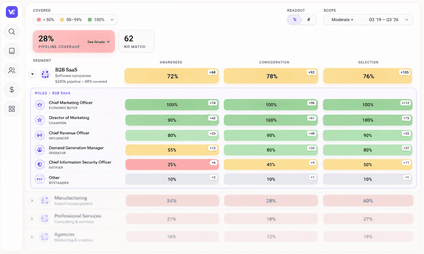
- Audit before you create. Before producing anything new, check what you already have against the grid. Most teams discover they have five assets for one popular cell and nothing for three others — a coverage gap you can't see without mapping the grid first. This is also what a covered funnel actually looks like in practice: coverage, not volume.
- Build role- and persona-specific variants, not one-size-fits-all assets. An ROI calculator serves a Decision Maker or Economic Buyer; a technical architecture doc serves a User or Influencer; a one-pager built for internal forwarding serves a Champion trying to build consensus with a skeptical committee. Structure each piece so the key answer is extractable in the first few lines — useful for the human skimming it and for any AI system trying to cite it.
- Keep the map current. Roles rotate mid-deal, committees add stakeholders as review cycles lengthen, and content that isn't refreshed goes stale fast — pages left untouched for a full quarter are measurably more likely to lose their standing with AI systems that favor recency. Revisit the grid on a cadence, not just when a campaign kicks off.
Ready to see where your own coverage stands? Request your content coverage heatmap →
Where VelocityEngine Fits In
We built VelocityEngine around this exact grid, because we kept seeing GTM teams do the mapping work in a slide deck once and then lose track of it. We think coverage is about to become a board-level term, the same way "pipeline" and "attribution" did before it.
The Content Coverage Heatmap scores your existing content against your revenue plan in real time, by segment, persona, and funnel stage — so instead of guessing whether you have anything for "IT Influencer, mid-funnel, enterprise segment," you can see it, in green or red, and drill into the gap directly. The Campaign Operating System then builds the on-brand content to close those gaps, with persona- and stage-aware messaging logic built into the workflow itself, so a new asset is targeted correctly by design rather than by a reviewer catching it later. Coverage updates automatically as content ships, so the map doesn't go stale the way a persona doc in a shared drive usually does.
We don't think of persona and buying-role work as strategy documents you write once. We think of it as a living coverage map — one your whole GTM team can see, and one that keeps working as your buying committees keep growing. Map your own buying committee →
Is a buying role the same thing as a persona?
No. A persona describes who someone is professionally — their job, goals, and pain points. A buying role describes what they're doing on a specific deal, like Influencer or Decision Maker. The same persona can occupy different buying roles on different deals, and one person can hold multiple roles at once.
How many people are typically on a B2B buying committee in 2026?
Estimates converge around 8–13 stakeholders on average, up from roughly 5.4 a decade ago, often spanning three to four functions such as IT, finance, operations, and end users (Gartner; Demandbase, 2025).
Can one person hold more than one buying role?
Yes, and it's common. A CTO, for example, might act as both an Influencer — shaping technical criteria — and a Gatekeeper — controlling which vendors get further access to the team.
Do I need separate content for every persona-and-role combination?
Not every combination will be common enough to justify a dedicated asset. The goal is visibility into the grid so you can prioritize the cells with real deal volume, rather than discovering the gap mid-deal when a stakeholder asks for something you don't have.
How is AI changing the way GTM teams should think about personas and buying roles?
Buyers now do roughly five hours of independent research — much of it through AI tools — for every hour spent with a sales rep, and a majority start that research in AI before a search engine. That means content gaps are now also AI-visibility gaps: if an AI system can't find role-specific, extractable content for a given persona, it can't recommend you either.
What's the fastest way to see where our content actually has gaps?
Map your buying committee and audit existing content against it before producing anything new. Tools built for this — including VelocityEngine's free Coverage Score — can generate an initial coverage map from your public content so you're prioritizing real gaps instead of guessing.